tatarmm
Remote Monitoring and Management
Alternative Vendors


Commercial Alternatives


Key Features
Client, site and computer settings
Each module is set once for a client, then replaced where needed for one site or one computer.
Monitoring and alerts
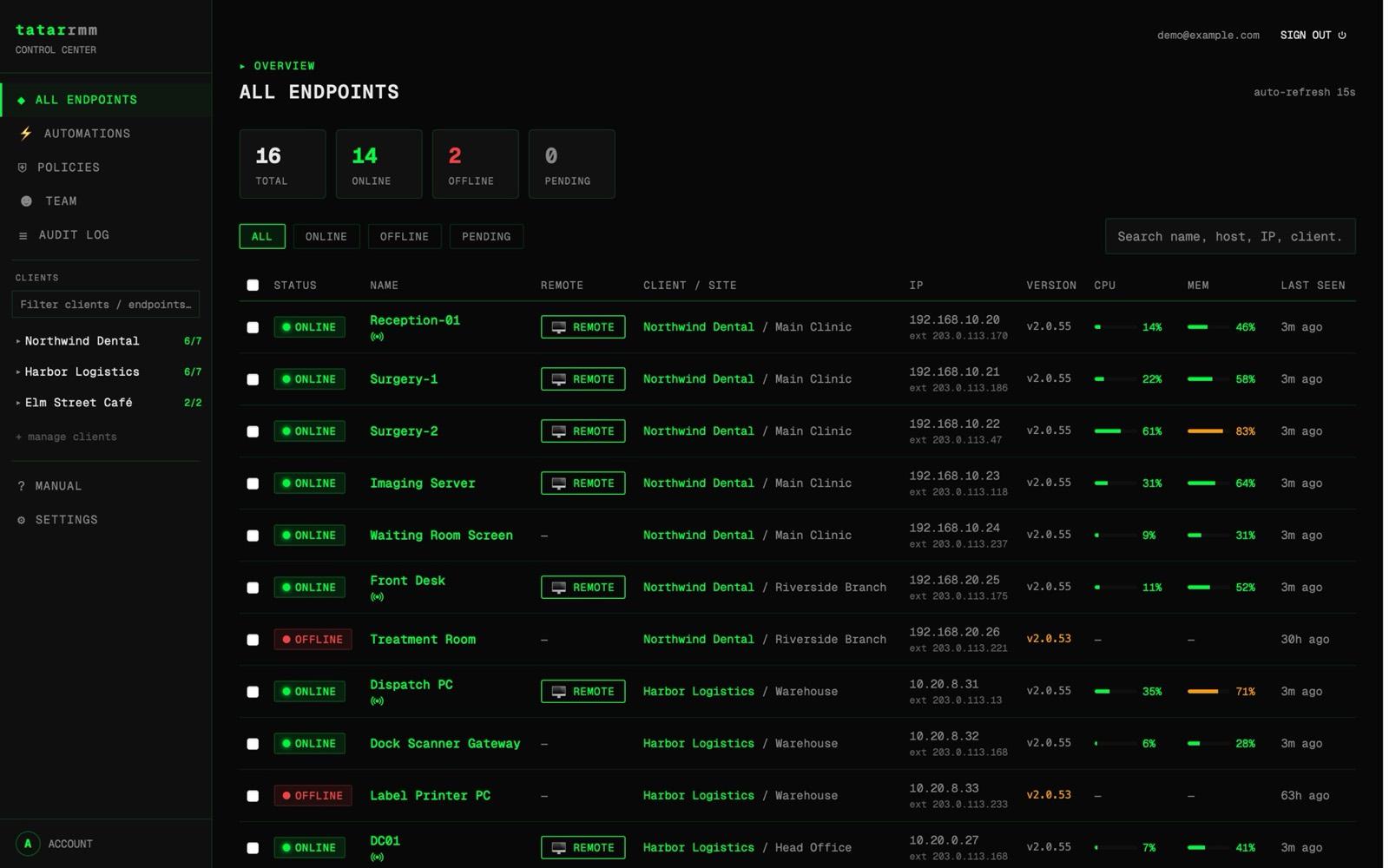
Live status and inventory, metrics refreshed every 30 seconds, monitors that run a fix when a check fails, and alerts by email, Teams or Slack.
Remote access
Web Remote in the browser with several monitors, files and clipboard, plus a remote shell, AnyDesk with a temporary password and an option to ask the user first.
Windows and winget patching
Windows updates run on schedules per client, site or computer and are approved in one click, and winget keeps third-party programs up to date.
Security events
Sign-in failures, Remote Desktop sign-ins, new administrators, new services and cleared logs are collected every 15 minutes, searchable and covered by alert rules.
Network discovery and map
A probe in each site finds routers, switches, printers, NAS boxes, cameras and phones and draws the network map.
Pros and Cons
Pros
Free for 10 endpoints
The free plan has no time limit and needs no credit card.
Many modules in one console
RMM, remote access, patching, SIEM, documentation, IAM, EDR and network monitoring are live in the same product.
Passkeys and signed updates
No passwords, signed agent requests, and agent updates signed with a key kept offline.
Low per-endpoint price
$0.10 per endpoint per month, down to $0.07 in the 1,000-endpoint bundle, billed monthly by Stripe, change or cancel anytime.
Raspberry Pi support
First-class Raspberry Pi support, with an agent for arm64 and armv7.
Cons
Beta product
The site labels the product beta, in production with a few clients, with new features every week.
No self-hosted edition
tatarmm.com offers no self-hosted edition and links no source code.
Several modules still coming
PSA, SOC, SaaS management, cloud backup, email security, ZTNA, XDR and MDR are listed as coming.
Windows-first features
Patching and computer policies are described for Windows only, and EDR is built on Microsoft Defender.
No public documentation
The site links no manual, public docs or API reference.
Feature Comparison
Comments
No reviews yet. Be the first to share your experience with tatarmm.
Frequently Asked Questions
/vendor/tatarmm