
SolarWinds Patch Manager
Patch Management
Alternative Vendors


Commercial Alternatives


Key Features
Automated Patch Deployment
Centralized deployment and scheduling of Microsoft and third-party application updates through WSUS, with prebuilt and custom packages
WSUS/SCCM Integration
Seamless integration with Microsoft WSUS and SCCM environments extending capabilities for third-party application patching
Compliance Reporting
WSUS, Configuration Manager and graphical patch compliance reports for audits
Virtual Environment Support
Patches virtual desktops and servers, including offline virtual machines
Custom Package Builder
Package Boot Editor and wizard to build custom packages with pre and post actions such as stopping services or closing processes
Update Management Tasks
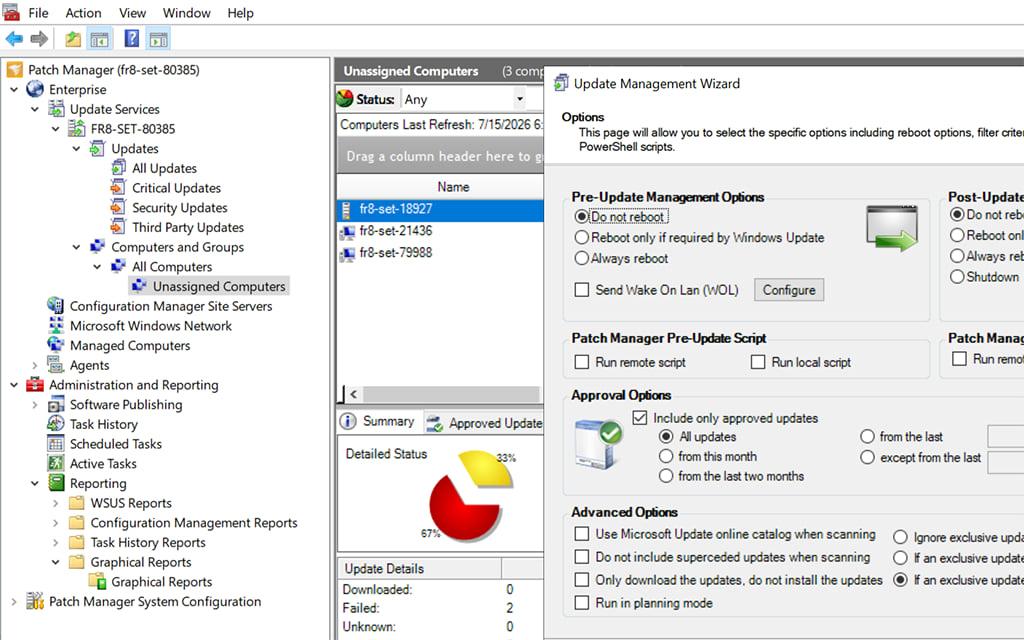
On-demand or scheduled update tasks with reboot control, Wake on LAN and pre and post scripts
Pros and Cons
Pros
Third-Party Application Support
Publishes updates for common third-party Windows applications such as browsers, Adobe, Java and 7-Zip alongside Microsoft updates
WSUS/SCCM Integration
Seamless integration with existing Microsoft infrastructure extending rather than replacing current investments
Automated Scheduling
Flexible scheduling with reboot options, Wake on LAN and pre and post scripts
Compliance Reporting
Detailed patch compliance reports and audit trails supporting regulatory requirements and security assessments
Keeps Data On-Premises
Runs entirely on your own Windows servers alongside WSUS
Cons
Windows Only
Patches Windows systems and Windows applications only; no macOS or Linux patching
Configuration Complexity
Complex initial setup and configuration process requiring Windows Server and WSUS expertise
No Published Pricing
Node-based licensing is quote-based, with no prices on the product page
Not Multi-Tenant
No per-client separation or MSP console; each environment needs its own WSUS infrastructure
Feature Comparison
Comments
No reviews yet. Be the first to share your experience with SolarWinds Patch Manager.
Frequently Asked Questions
/vendor/solarwinds-patch-manager