Flamingo Raises $4.5M to Get MSPs Out of the Ticket Queue · Our seed round, led by Vertex Ventures, funds OpenFrame: open-source tools plus AI agents that answer tickets with technician oversight.
KeePass
Documentation and Password Management
Alternative Vendors


Commercial Alternatives


Key Features
Local Password Storage
Stores all passwords locally on your device rather than in the cloud, giving you complete control over your data and eliminating risk of online breaches
Strong Encryption
Uses industry-standard AES-256, ChaCha20, and Twofish encryption algorithms to protect your password database
Extensive Plugin System
Over 180+ downloadable plugins available to extend functionality including import/export capabilities, UI modifications, and additional features
Auto-Type Functionality
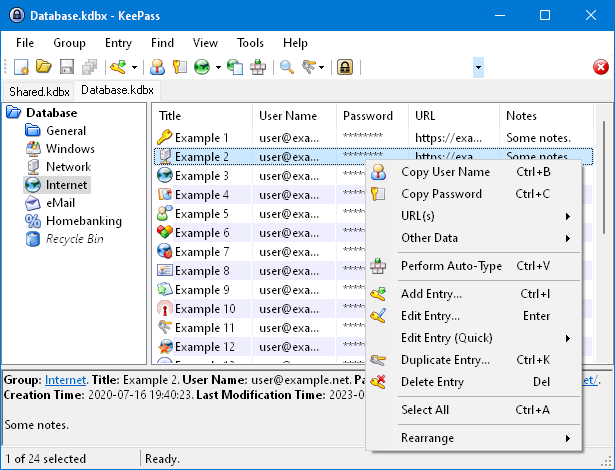
Global auto-type feature that automatically types credentials into login forms using customizable keyboard shortcuts and sequences
Cross-Platform Support
Available for Windows, Linux, and Mac with third-party mobile apps for Android and iOS devices
Pros and Cons
Pros
Completely Free
No licensing fees, subscription costs, or premium tiers - all features are available at no cost
Open Source Security
Open source code allows security auditing and is recommended by government agencies like German BSI
Local Data Control
All data stored locally eliminates cloud breach risks and provides complete user control over sensitive information
Highly Customizable
Extensive plugin ecosystem and configuration options allow tailoring to specific needs
Cons
Steep Learning Curve
Complex setup and unintuitive interface make it difficult for non-technical users to configure and use effectively
No Auto-Save
Does not automatically capture and save passwords from websites, requiring manual entry of all credentials
Limited Mobile Support
Only third-party mobile applications available, no official native mobile apps from the developer
Manual Sync Required
No built-in cloud sync - users must manually set up file sharing or synchronization across devices
Feature Comparison
Comments


Kateryna Shevchenko • SecureFlow Technologies
Jun 26, 2025
Essential for Client Access Management
As an Identity & Access Manager, KeePass provides the security foundation we need for client credential management. The open source nature allows us to verify security implementations.


Levi Sanders • SecureOps Technologies
Jun 26, 2025
Secure Password Management for MSPs
KeePass encrypted database approach is perfect for managing client credentials securely. The master key system ensures our MSP team has controlled access to sensitive client passwords.