OpenFrame Gen1 is Here

IPFire logo

IPFire

Network Management and Monitoring

Open Source
Self-hosted
E
Enterprise
OpenMSP Score
0
N/A
Reddit Impact Score
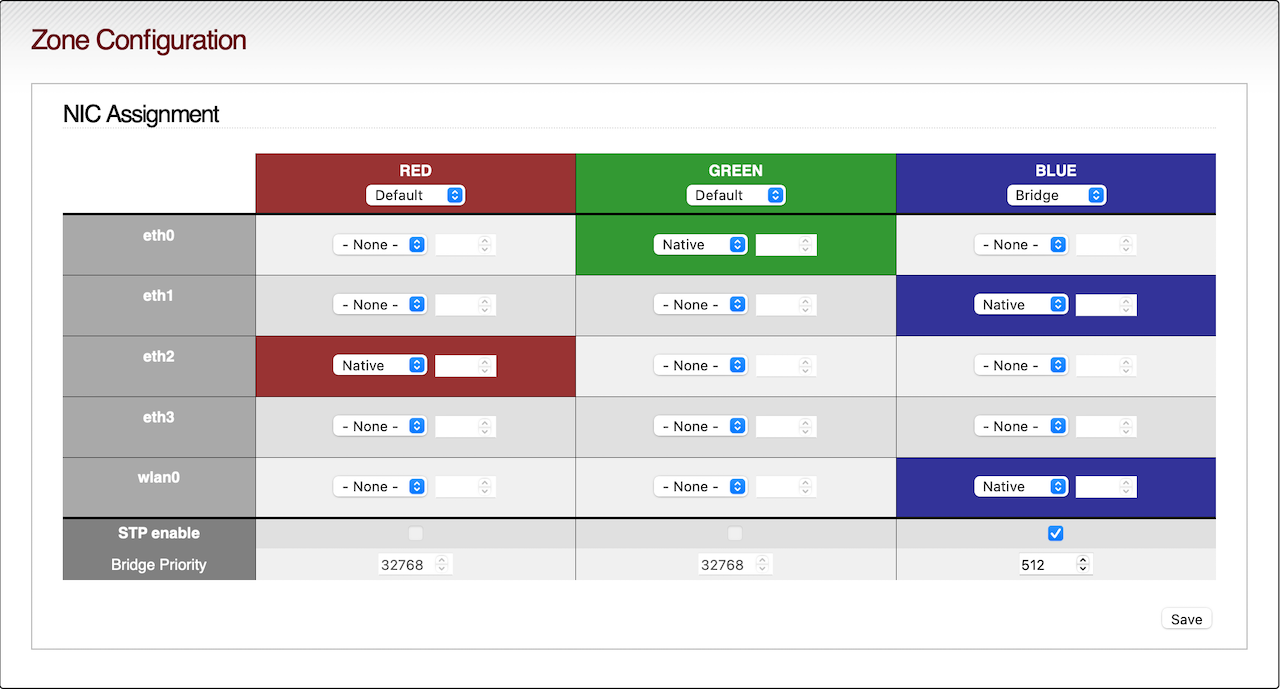
IPFire is a free, open-source firewall operating system built on a hardened Linux kernel. It originated in 2005 as a fork of IPCop (itself descended from Smoothwall) and is now maintained by an independent core team plus an active community. IPFire uses Linux Netfilter for stateful packet inspection and a color-coded network-zone model (Red/Green/Orange/Blue) to segment untrusted, trusted, DMZ, and wireless networks. Core capabilities include Suricata-powered intrusion detection/prevention, IPsec/OpenVPN/WireGuard VPN, traffic shaping/QoS, a Squid-based web proxy with content filtering, and recursive DNS via Knot Resolver with DNS firewalling. Functionality extends via "Pakfire," IPFire's built-in package manager, which installs add-ons like Icinga monitoring, Tor, and ModSecurity. IPFire ships near-monthly "Core Updates" and is licensed under the GNU GPLv3. It also maintains IPFire Location, a free open-source IP geolocation database used by projects like Tor. Commercial hardware appliances and paid support are available through partner Lightning Wire Labs, while the core software remains free indefinitely. IPFire is especially known for running well on modest or older hardware.
image media

Key Features

Intrusion Detection & Prevention

Real-time signature-based IDS/IPS powered by Suricata with community and emerging-threats rule sets plus email alerting.

VPN Support

IPsec, OpenVPN, and WireGuard site-to-site and remote-access VPNs configured directly via the WebGUI.

Web Proxy & Content Filtering

Squid-based caching proxy with URL filtering, category blocklists, and AD/LDAP authentication.

DNS Services

Recursive/forwarding DNS via Knot Resolver with DNS-over-TLS, malware/ad-domain firewalling, and SafeSearch enforcement.

Pakfire Add-on System

Built-in package manager for installing extensions such as Icinga monitoring, Tor, and ModSecurity without leaving the managed OS.

Quality of Service / Traffic Shaping

Bandwidth prioritization and shaping rules for managing network performance across zones.

Pros and Cons

Pros

Genuinely Free and Open Source

GPLv3 licensed with no feature paywalls; full firewall/VPN/IDS functionality is available at no cost.

Runs Well on Modest Hardware

Well known for low resource requirements, making it attractive for budget or repurposed-hardware deployments.

Frequent Security-Focused Releases

Near-monthly Core Updates deliver active security patching and new features.

Strong Built-in VPN and IDS/IPS

WireGuard, OpenVPN, IPsec, and Suricata are integrated and configurable without add-ons.

Extensible via Pakfire

A native add-on ecosystem lets admins bolt on monitoring (Icinga), Tor, and more.

Cons

No Native Multi-Admin/RBAC

The WebGUI has historically been limited to a single admin account, with multi-user role-based access a long-standing unresolved request.

No MFA on Admin Login

2FA exists for OpenVPN client authentication, but the WebGUI admin login itself lacks built-in MFA.

No Official REST API

Automation/integration relies on unofficial, experimental third-party projects rather than a supported API.

No Official Docker/Kubernetes Support

Only unofficial community-built Docker images exist; native container/K8s support remains an open request.

Smaller Ecosystem Than BSD Competitors

Fewer commercial integrations and cloud marketplace offerings than OPNsense/pfSense.

Feature Comparison

Comments

No Comments Yet

Be the first to share your experience with IPFire.

Frequently Asked Questions

Getting Started

OpenMSP is The MSP Knowledge Hub & Community Platform designed specifically for Managed Service Providers seeking to optimize their technology stack, reduce vendor costs, and discover open-source alternatives. We combine a comprehensive vendor directory, open-source solution catalog, and integrated community discussions to help MSPs make informed decisions.
Yes, completely free. Browse vendors and tools, read comparisons, and join community discussions - no cost, no registration required. OpenMSP is community-supported and focused on empowering MSPs to reduce costs and improve operational efficiency through open-source technology.
We help MSPs identify cost-effective alternatives to expensive commercial solutions, provide transparent vendor information, and connect you with proven open-source alternatives. Our platform enables MSPs to make informed decisions about their technology investments.
No account required for browsing vendors, reading comparisons, or accessing community content. Creating a free account with SSO (Microsoft, Google, or Slack) allows you to participate in discussions and save your favorite tools.

Platform Information

OpenMSP is currently community-supported. We focus on providing value to the MSP community first. Any future monetization will keep the core platform free for MSPs while maintaining our independence and commitment to unbiased information.
We focus exclusively on MSP needs with transparent vendor information and open-source alternatives. No vendor partnerships or sponsored listings - just honest, community-driven information to help MSPs make better technology decisions. Our biggest value is our community where MSPs help each other with questions, setup guidance, and sharing real-world experiences.
Our community of MSP professionals helps verify and update information. We also maintain direct research on tools and vendors to ensure accuracy. Community members can report outdated information, and we work to keep everything current.
OpenMSP was founded by Michael Assraf, who has extensive experience in the MSP industry and product leadership. As the former CEO & Founder of Vicarius, Michael grew a startup from $0 to $9M ARR with 500+ customers and deep experience working with MSPs, partners, and fundraising. OpenMSP represents his commitment to empowering the MSP community through better technology decisions and cost optimization.

Open-Source Tools & Alternatives

We assess tools based on active development, community size, documentation quality, production deployments by MSPs, and available support options. Tools must meet strict criteria for reliability and enterprise readiness.
Many open-source projects offer multiple support options including community forums, commercial support from vendors, professional services, and our community discussions where experienced MSPs share implementation guidance.